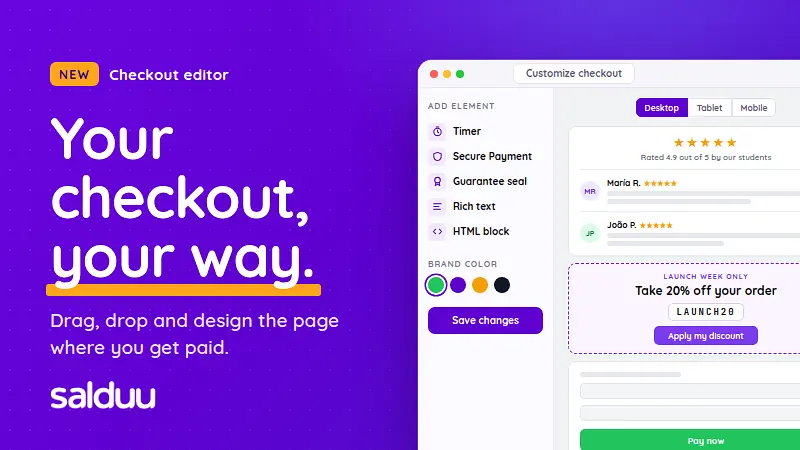
Meet the new checkout editor
Design the page where you get paid: a live preview, drag-and-drop blocks, your own colors, and ready-to-paste recipes for reviews, coupons and more.
Updated on 29 of September, 2026
#checkout #product updates #sales tips #tutorials
Your checkout, your way: meet the new checkout editor
Your checkout is the last page a buyer sees before they pay. Until now, every Salduu checkout looked the same: you could switch a few widgets on or off, and that was it.
Starting today, you can design it. The new checkout editor gives you a live preview of your checkout, blocks you can drag into place, your own colors, and two new blocks for your own content: Rich text and HTML.
In this post we'll walk through what the editor can do, then share ready-to-use recipes: customer reviews, a one-click coupon button and more. Copy one, change the text, and it's live on your checkout.

What's new at a glance
- A live preview of your checkout. Every change shows up right away, the way your buyers will see it.
- Drag and drop. Move blocks up and down, above or below the payment form.
- Desktop, tablet and mobile views. Check every screen size before you publish.
- Your colors. Your brand color on the pay button, and a background color for each block.
- New blocks. A guarantee seal with three designs, up to 3 rich text blocks and up to 2 HTML blocks.
- Drafts. Your edits are saved as a draft and only go live when you click Save changes.

Get started in three steps
- Go to Products and click Customize checkout on the product you want to edit. You'll also find the button at the top of the product's edit page.
- Choose blocks from the Add element list in the side panel. Each one appears in the preview right away.
- Drag them into place, adjust them, and click Save changes to publish.

Every block in the preview has two small buttons: the pencil opens its settings, and the X removes it from your checkout.

The building blocks
Guarantee seal (new). A 60-day money-back guarantee seal in three designs: Gold, Ribbon and Shield. It tells buyers they can get a full refund within 60 days (Salduu's guarantee period).
Timer. A countdown bar of 1, 5 or 15 minutes with your own message.
Secure Payment. A badge that reassures buyers right where they enter their payment details.
Viewers. A bar with a viewer count which based on the number you set ranges between ± 2.
Cover and banner. A wide cover image at the top of the checkout (at least 1200 px wide) and a vertical banner next to the payment form (300 px wide).
Colors. Your brand color is used on the pay button. Timer, Secure Payment, Viewers and the guarantee seal each have their own background color, and their text switches between light and dark automatically so it stays readable.
Rich text blocks
Add up to 3 rich text blocks. Click the pencil and write directly in the preview. You can use headings, bulleted and numbered lists, bold, italics, underline, highlighted text, links, dividers and images you upload. Click Save on the block when you're done.
Here are three that work well on almost any checkout.
Tip: What you'll get
Remind buyers what they're paying for, right where they pay.
- Add a Rich text block and click the pencil.
- Add the heading "What you'll get".
- Add a bulleted list with your main deliverables, one per line.
- Select the most important phrase and highlight it.

Tip: Meet your instructor
People buy from people. A friendly photo and a few lines about you build trust quickly.
- Add a Rich text block and upload a photo of yourself.
- Below it, add a heading with your name.
- Write 2 or 3 sentences: who you are, what you've done, and why you made this product.

Tip: What happens after you pay
Buyers hesitate when they don't know what comes next. Tell them, and you'll get fewer "where is my access?" messages too.
- Add a Rich text block with the heading "What happens after you pay".
- Add a numbered list with the steps. For example: you receive an email with your access link, you log in and start with lesson 1, and you reply to that email if you need help.
- Drag the block below the payment form, where buyers look for reassurance.

HTML blocks: full control
When you want full control over the design, add an HTML block. Click the pencil to open a code editor inside the preview, paste your HTML and click Save.
The recipes below are ready to paste. Change the text and colors to match your product. You can add up to 2 HTML blocks, so pick the two recipes that fit your product best, or combine small ones into a single block.
Tip: Customer reviews
Nothing convinces a buyer like other buyers. This block shows an overall rating and three reviews, with initials instead of photos.

<div style="text-align: center; padding-bottom: 12px;">
  <div style="color: #f59e0b; font-size: 22px; letter-spacing: 2px;">★★★★★</div>
  <p style="margin: 4px 0 0; font-size: 14px; color: #6b7280;">Rated 4.9 out of 5 by our students</p>
</div>

<div style="display: flex; align-items: flex-start; padding: 12px 0; border-top: 1px solid #e5e7eb;">
  <div style="flex-shrink: 0; width: 40px; height: 40px; margin-right: 12px; border-radius: 50%; background-color: #ede9fe; color: #6d28d9; font-weight: bold; display: flex; align-items: center; justify-content: center;">MR</div>
  <div>
    <p style="margin: 0; font-weight: bold; color: #111827;">María R. <span style="color: #f59e0b; font-weight: normal;">★★★★★</span></p>
    <p style="margin: 4px 0 0; color: #374151; line-height: 1.5;">"I finished it in two weekends and landed my first client the week after."</p>
  </div>
</div>

<div style="display: flex; align-items: flex-start; padding: 12px 0; border-top: 1px solid #e5e7eb;">
  <div style="flex-shrink: 0; width: 40px; height: 40px; margin-right: 12px; border-radius: 50%; background-color: #dcfce7; color: #15803d; font-weight: bold; display: flex; align-items: center; justify-content: center;">JP</div>
  <div>
    <p style="margin: 0; font-weight: bold; color: #111827;">João P. <span style="color: #f59e0b; font-weight: normal;">★★★★★</span></p>
    <p style="margin: 4px 0 0; color: #374151; line-height: 1.5;">"Clear, practical and straight to the point. The templates alone were worth it."</p>
  </div>
</div>

<div style="display: flex; align-items: flex-start; padding: 12px 0 0; border-top: 1px solid #e5e7eb;">
  <div style="flex-shrink: 0; width: 40px; height: 40px; margin-right: 12px; border-radius: 50%; background-color: #fee2e2; color: #b91c1c; font-weight: bold; display: flex; align-items: center; justify-content: center;">SL</div>
  <div>
    <p style="margin: 0; font-weight: bold; color: #111827;">Sofía L. <span style="color: #f59e0b; font-weight: normal;">★★★★☆</span></p>
    <p style="margin: 4px 0 0; color: #374151; line-height: 1.5;">"Great content. I'd love more exercises, but I use what I learned every day."</p>
  </div>
</div>
IMPORTANT
The names, ratings, and quotes displayed above are placeholders only.
Under no circumstances may you publish fake or altered testimonials. Incorporating fabricated reviews into your custom HTML code constitutes a severe breach of our Terms of Service, destroys user trust, and carries heavy legal penalties under consumer protection laws.
Publish strictly 100% genuine reviews from real customers, using their exact words. Protect yourself from immediate, permanent account suspension and severe legal consequences.
Tip: Coupon with an "Apply" button
Promote a discount inside the checkout. One click on the button reloads the checkout with the coupon applied.

<div style="border: 2px dashed #7c3aed; border-radius: 12px; background-color: #faf5ff; padding: 18px; text-align: center;">
  <p style="margin: 0; font-size: 12px; font-weight: bold; letter-spacing: 2px; color: #7c3aed;">LAUNCH WEEK ONLY</p>
  <p style="margin: 6px 0 0; font-size: 20px; font-weight: bold; color: #111827;">Take 20% off your order</p>
  <p style="margin: 12px 0 0;">
    <span style="display: inline-block; padding: 6px 14px; border: 1px solid #ddd6fe; border-radius: 8px; background-color: #ffffff; font-family: monospace; font-size: 18px; font-weight: bold; letter-spacing: 3px; color: #111827;">LAUNCH20</span>
  </p>
  <p style="margin: 14px 0 0;">
    <a href="?coupon_code=LAUNCH20" style="display: inline-block; padding: 10px 22px; border-radius: 8px; background-color: #7c3aed; color: #ffffff; font-weight: bold; text-decoration: none;">Apply my discount</a>
  </p>
</div>
To use it:
- Create the coupon in Coupons first, and make sure it's active for this product.
- Replace
LAUNCH20with your coupon code in both places.
The button works by adding ?coupon_code=YOURCODE to the checkout address. You can use the same trick anywhere: add ?coupon_code=YOURCODE to your checkout link in emails or social posts, and buyers arrive with the discount already applied. Coupons don't apply to subscription products.
Drafts, preview and publishing
Every change you make is saved automatically as a draft, and you'll see Draft saved in the side panel. Buyers keep seeing your current checkout until you click Save changes.
Before you publish:
- Use the Desktop / Tablet / Mobile switch to check each screen size.
- Click Preview to see the checkout at full size.
- Click Go to checkout to open your live checkout in a new tab.
About reviews: Changes to text, HTML, the cover or the banner are checked by our team before they go live. While the review is pending, the checkout is paused, and a review can take up to 24 business hours. Colors, block order and the other blocks never need a review, and neither does removing content.
A quick checklist before you publish
- Is it clear what the buyer gets? A "What you'll get" or "Everything included" block answers that.
- Does it look good on a phone? Many buyers pay from their phone, so check the mobile view.
- Is it focused? A few strong blocks work better than every block at once.
- Is everything true? Reviews, bonuses and promises must be real.
Try it today
Go to Products, click Customize checkout, and start with one recipe from this post. It takes a few minutes, and it's the page where every sale happens.
Subscribe for free to Salduu
You'll be the first to know when Salduu uploads a new product, or posts something on their blog!